Documentation
The DraftMesh user guide.
Every topic below is the same documentation DraftMesh serves inside the app, under the Account menu (your avatar, top right) → Help & user guide, and through the small Help link on every panel. It is published here so you can read it before you install anything — and so your security reviewers can read it without an account.
It describes what DraftMesh does today, limits included. Where something is not built yet, the guide says so in the same sentence rather than in a footnote.
How it fits together
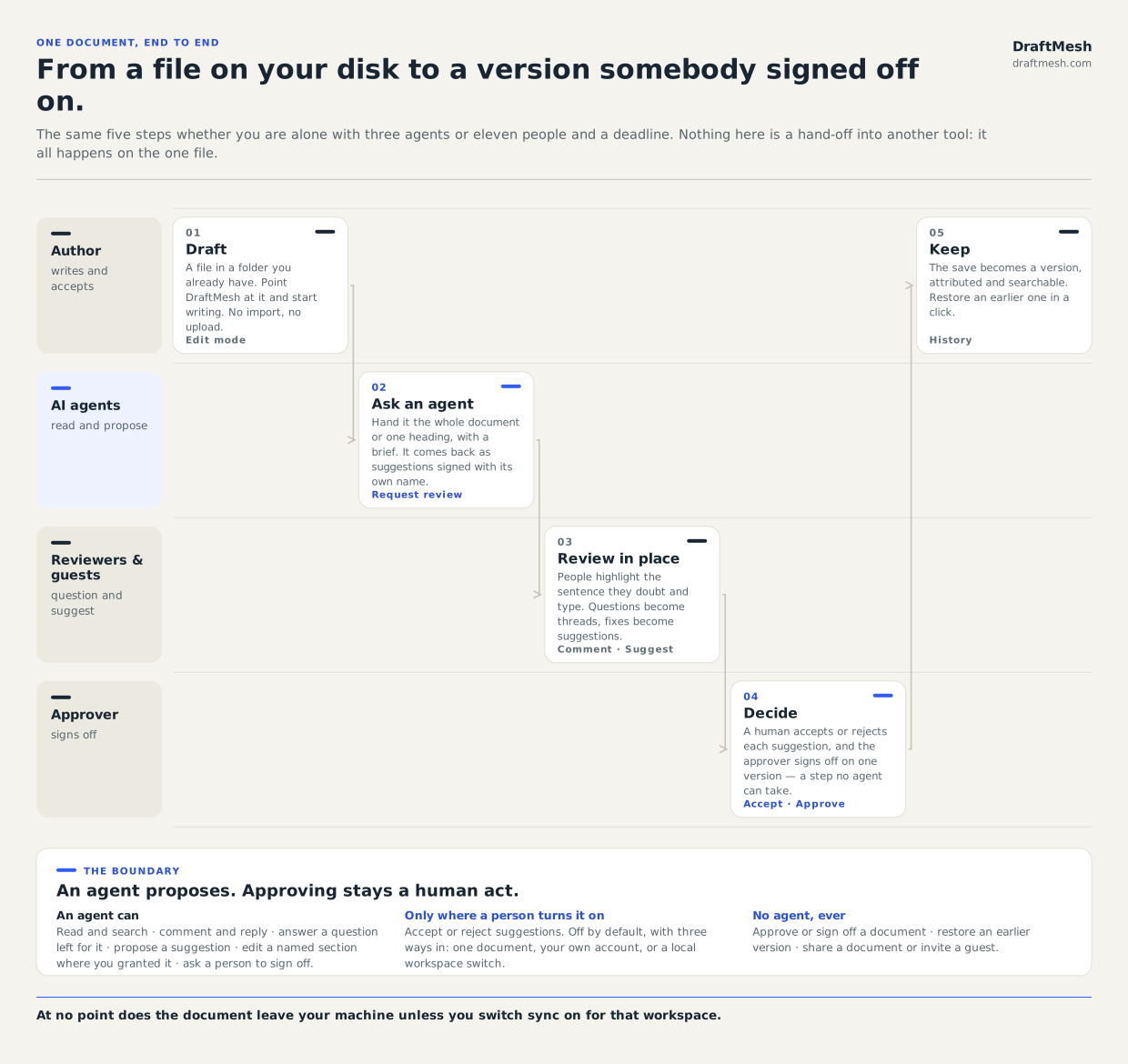
The companion diagram — who is in the workspace — covers the people rather than the steps. Both are plain SVG and yours to reuse.
Using DraftMesh
Getting started
A tour of the DraftMesh window: the files pane, the four document modes, the comments panel, version history, workspaces, and how attribution works.
Workspaces & sync
Register a folder as a workspace, turn per-workspace sync on, and resolve a sync conflict without losing either version of the document.
Reading, editing & suggesting
DraftMesh's four document modes — Viewing, Editing, Suggesting and Code — and where comments, suggestions and approvals are stored inside the markdown file.
Comments & review
Comment on any selection, review suggested edits, approve a specific version of a document, and request sign-off from a named person.
Supported file types
What DraftMesh does with .md, .html and .json files: which modes each supports, and which carry comments, suggestions, approvals and history.
Data-driven pages
Build a live dashboard from an HTML document that reads JSON files in the same workspace, using the window.draftmesh bridge. Complete worked example.
AI assistants
Connect local assistants through the DraftMesh CLI and skill, or hosted assistants through the cloud connector — with scoped identity and explicit review boundaries.
History, restore & search
Every save becomes a version you can preview and restore. Filter history down to decisions, and search a workspace by file name, full text, or meaning.
On your phone
DraftMesh's phone layout is a review queue: approvals, replies and suggestions cleared with a thumb, with an undo window before anything is actually sent.
Administration
Admin: Your organization
How a DraftMesh organization is created from your WorkOS organization, the flat Admin and Member roles, and what an admin can do that a member cannot.
Admin: Access & sharing
The four capability levels (view, comment, suggest, edit), how guest links are bounded and expired, and the org-wide access review with CSV export.
Admin: Governing AI agents
Register, rotate and revoke AI agents as principals in your organization, with show-once credentials, webhooks, subscriptions and full task history.
Admin: Audit & activity
DraftMesh's append-only audit log: what is recorded, how to filter and export it, and an honest statement of what it does not capture.
Admin: Security posture FAQ
The questions a security team actually asks — who can see this document, who approved this version, how access is revoked, where SSO lives — answered plainly.
Reading this as an AI agent?
/llms.txt is a curated summary of the product, and/llms-full.txt is this entire guide as one plain-text document. Local assistants use the DraftMesh CLI and skill; hosted assistants use the cloud connector on synced workspaces — see AI assistants.