Supported file types
What DraftMesh does with .md, .html and .json files: which modes each supports, and which carry comments, suggestions, approvals and history.
DraftMesh manages the file types in the table below, and lists all of them except images, which are shown inside the documents that use them. Everything else in the folder is left alone.
Anything the folder’s .gitignore rules ignore stays hidden, and it is never versioned or synced — so DraftMesh on your own machine refuses a save to an ignored path (including an image upload into an ignored folder) and says why, instead of reporting a save it could never keep. Remove the matching rule, or save the file somewhere else. A file that was already versioned before a rule started matching it is still saved and versioned as usual. Workspaces in your DraftMesh account have no .gitignore of their own.
The extensions are matched exactly, so .md, .html and .json are documents while .htm, .jsonc and .json5 are not — a file with one of those is simply left where it is. Case doesn’t matter.
.markdown sits in between. DraftMesh running on your own machine lists it and opens it like any other markdown file, but it is outside the sync scope — so it stays on that machine and never travels to your account. Rename it to .md if you want it synced.
Files and folders whose name starts with a dot stay on the device. .claude/, .vscode/, .cursor/, .devcontainer/, .obsidian/, .mcp.json and every other dot-prefixed name are where AI assistants and editors keep settings that can run commands. If one synced, a teammate or a write-capable agent could change what runs on everyone else’s computer. So a file at such a name is never synced in either direction, whatever its type, and DraftMesh cloud refuses to save one and says why. A copy already on a computer stays where it is: DraftMesh doesn’t delete it, and the next sync doesn’t remove it. This needs the DraftMesh release after 0.3.22 on your computer. An older version still receives dot-files your account stored before the rule, and its sync stops sending changes while one of its dot-files has changed, until it is updated.
Names every computer can store. DraftMesh won’t create a file or folder whose name a Windows or Mac computer can’t hold as written. That covers a name containing : (a Mac writes one when a file name is typed with /), a name ending in a dot or a space, a Windows device name such as CON, NUL or COM1 (with any extension), and a name that differs from an existing one only in upper/lower case or accents, such as Readme.md beside README.md. With the release after 0.3.22, such a file stays on your computer and the rest of the folder keeps syncing; rename it and it syncs. An older version’s sync stops sending changes until the file is renamed. DraftMesh cloud refuses to save one and says why. Names your account already holds are kept as they are, and their folders keep taking new files.
| Type | Extension | What it’s for | Modes | Comments & suggestions | Approvals | History & sync |
|---|---|---|---|---|---|---|
| Markdown | .md | Prose documents — the heart of DraftMesh | Read, Suggest, Edit | Yes | Yes | Yes |
| HTML | .html | Rendered pages: dashboards, reports, business cases | Read, Source | Comments only | Yes | Yes |
| JSON | .json | Data files, typically feeding an HTML page | Read, Source | No | No | Yes |
| Google reference | .gdoc, .gsheet, .gslides | A pointer to a document that lives in Google Drive | Read, Source | No | No | Yes |
| Office document | .docx, .xlsx, .pptx | Word, Excel and PowerPoint files, previewed in place | Read | No | No | Yes |
| Source file | .css, .js | Stylesheets and scripts beside an HTML page | Read, Source | No | No | Yes |
| Image | .png, .jpg, .jpeg, .gif, .webp, .svg | Pictures a document shows — screenshots, diagrams | Shown inside documents | No | No | Yes |
New document offers Markdown first and the rest — HTML, JSON, CSS, JavaScript — behind Other format…, because markdown is the only one of them that carries suggestions and sign-off.
Word and PDF exports
A Markdown document’s ⋯ menu can download a Word (.docx) or PDF copy. Word keeps the document’s Unicode text. PDF includes its normal Latin, Greek, and Cyrillic fonts; when a character is unavailable it shows a visible □ and names the affected writing systems on the first page rather than silently substituting the wrong character.
On a DraftMesh running on your own machine, run draftmesh setup --pdf-fonts to add the optional pinned font pack (about 19 MB). It adds Japanese-region CJK fallback plus monochrome Noto Emoji for supported emoji, including supported joined sequences, flags, skin-tone modifiers, variation sequences, and keycaps. It does not claim every Unicode character or every regional CJK form. The command is the only step that downloads these fonts; opening or exporting a document never downloads them. On a DraftMesh cloud host, a DraftMesh operator must provision the same pack against its persistent state directory; the local command does not install fonts on the hosted service.
Markdown documents
Full collaboration: all three modes, comments and suggestions anchored to any selection, approvals, version history, search, and sync. The file stays plain markdown that any editor can open.
HTML documents
An .html file renders as a real page inside a sandboxed frame — styles and scripts work, but the page has no access to your account or to DraftMesh’s API, and it reaches the workspace only through the JSON data bridge described below. It cannot load anything from the internet or send anything to it: external scripts, stylesheets, images and fonts, network requests and form submissions are all blocked, so scripts and styles must be inline or sibling .js / .css files in the workspace, and images and fonts must be inline data: URLs. One limit the browser does not let DraftMesh close: a page’s script can still send its own frame to a web address, so treat an HTML document’s scripts like any code you choose to run. You can comment on the rendered content and approve the document; editing happens in Source mode, beside Read in the document header. HTML pages can link to other documents in the same workspace with ordinary relative links, and can read JSON data files from the workspace and update live — see Data-driven pages.
JSON data files
A .json file opens as a collapsible tree in Read mode and as an editable text file in Source:
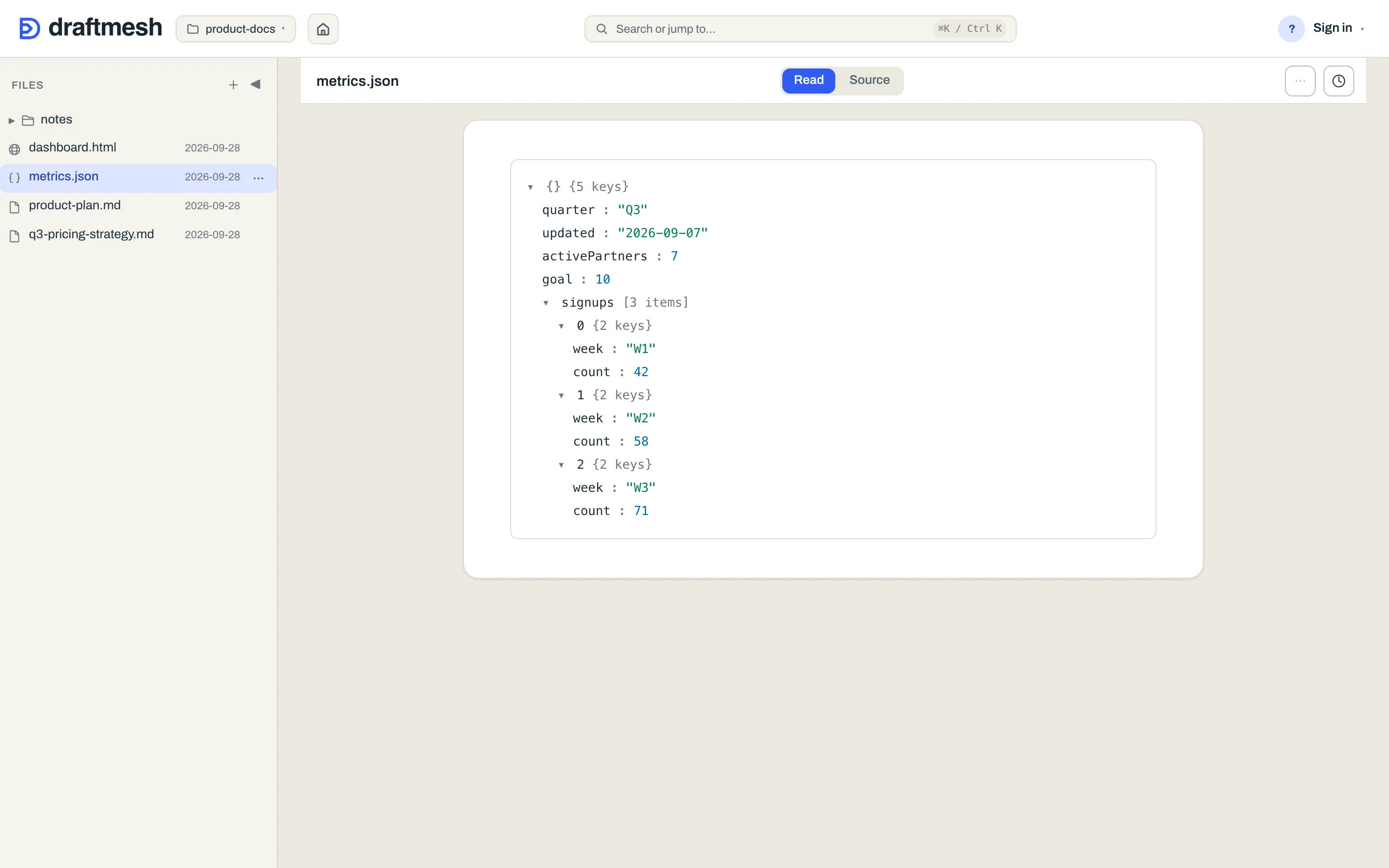
JSON files are data, not prose, so they deliberately carry no comments, suggestions, or approvals — but they are versioned like everything else, so history answers “who changed this number, and when”, and any version can be restored. DraftMesh refuses to save invalid JSON (from the editor or from an AI agent), so a typo can’t silently break the dashboards reading the file. A JSON file written invalid by an outside tool still opens — Source shows it with a notice so you can fix it.
Google reference files
A .gdoc, .gsheet or .gslides file — the small pointer file Google Drive for Desktop leaves on disk — is not the document. It is a few hundred bytes naming a file that lives in Google, so DraftMesh lists it, syncs it and versions it like any other file, and opens it to a card with the document’s title, its owner, and an Open in Google link. That link is the way to read or change the document; the truth stays in Google, and nothing DraftMesh shows is editable here. There are no comments, suggestions or approvals on a pointer.
Connect Google and the card shows more. With the connector attached, DraftMesh reads the file’s details from Drive and takes a snapshot of its contents, framed as “Snapshot as of …” — a Google Doc as read-only text, a Slides deck as its slides in order, a Google Sheet as a read-only grid with its tabs. The snapshot is also what makes the document findable: a phrase that appears only inside the Google document will match the reference in search, and an AI agent reading the file through DraftMesh sees the snapshot text as well as the pointer. Both of those start once DraftMesh has actually taken the snapshot, which it does in the background shortly after you open the reference in DraftMesh, or an AI agent reads it through DraftMesh — and takes again, the same way, the next time either happens after the document has changed in Google. A snapshot, once taken, is kept on this machine across DraftMesh restarts. Searching never waits on Google, so a reference nobody has opened or read yet still matches on its title, its owner and its link, and matches on its contents from then on. Snapshots are a cache held on the machine that took them — they never travel on the sync wire and never become a document of their own. A very large spreadsheet may be too big to snapshot; that card keeps its details and its link.
Sharing a reference shares the snapshot. The snapshot is read with the Google access of the account that connected Google to this DraftMesh — Google’s own sharing on the referenced document is never consulted for whoever reads it here. So the rule is that a grant on a reference is a grant on its snapshot: treat a .gdoc, .gsheet or .gslides reference as workspace content whose text is the Google document’s, and share it as you would share the Google document itself. Today the two halves live on different hosts. Google connects only to the DraftMesh on your own machine, which has no sharing door, so the snapshot there is seen by whatever reads through that DraftMesh — the reference’s card, search, and any AI agent connected to it. DraftMesh cloud has no Google connector, so a reference reached through a hosted account — by a person it is shared with, or an agent granted it — shows the reference’s own details and its link, and matches search on those, with no snapshot. Where a grant is made, the door says so: the Share panel and the Connect-an-agent dialog both carry this note on a reference. A snapshot is held only on the machine that took it.
Every part of this degrades quietly. No connector, a revoked token, a deleted Drive file, Google being down — the reference still lists, still opens, and still shows its title and link; the snapshot is simply absent, and search falls back to matching the pointer’s own text as it did before. The one case that asks something of you is a connection made before slide previews existed: its access doesn’t cover Slides, so the card offers Reconnect Google.
Office documents
A .docx, .xlsx or .pptx file is an opaque container, not text, so DraftMesh previews it rather than editing it: Read mode renders the document, and there are no comments, suggestions or approvals. They are versioned and synced like everything else, and their text is extracted for search, so a phrase inside a Word document or a deck finds the file. A very large Word document may be too big to extract; it still previews, but phrases inside it won’t match in search, and an AI agent reading it gets no text.
Images
Images are files a document shows, not documents of their own: they don’t appear in the Files list, and they can’t be shared, commented on or approved by themselves. A markdown document shows one with an ordinary relative image link — to images/shot.png, say — and the picture appears wherever the document is read, including a shared link and the phone. Images are versioned and sync between your devices and your account like everything else, up to 5 MB each.
Adding an image. In Edit mode, paste an image, drop an image file onto the page, or use Image on the formatting toolbar to pick one. DraftMesh saves it into an images folder beside the document and inserts the link where your cursor was. A pasted screenshot is named for the moment it was pasted (pasted-20260924-142501.png), and a name that’s already taken gets a number (shot-2.png) rather than replacing the existing picture. Markdown source accepts a pasted or dropped image the same way. While an image uploads, a status line on the page says so. If the upload is refused (too large, or not really an image), that line says why and nothing is inserted. A paste that carries text as well as a picture — cells copied from a spreadsheet, say — pastes the text, as it always has. Suggest mode doesn’t upload: a suggestion proposes text, and an image is saved the moment it’s added. On the phone, Add photo… in a document’s ⋯ menu adds a photo at the end of the document, and Photo beside Comment and Suggest adds one after the passage you selected. Both work on a markdown (.md) document in a workspace you own, administer or have whole-workspace edit access to. Edit access to just one document does not include its image folder, so image uploads are not offered there on desktop or phone. Workspace editors need a host that reports this eligibility. Available in the local package from 0.3.18; check draftmesh --version and update with npm i -g draftmesh if yours is older. A camera photo (JPEG, or an iPhone HEIC photo) is re-saved as a JPEG without its location data, and shrunk if it’s large; a PNG, GIF or WebP image is added as it is unless it’s too large. Adding an image to the document’s folder on disk works too.

AI agents can add images the same way a document is saved (save_doc with the picture’s bytes), and embed them with a relative link. An agent needs the same permission to save an image as to save a document directly.
What can be uploaded. .png, .jpg/.jpeg, .gif and .webp. DraftMesh checks that the file really is the kind of image its name says, and refuses one that isn’t. SVG files are shown like any other image when they’re already in the workspace, but they can’t be uploaded or saved by an agent: an SVG can carry script, so it only arrives as a file added to the folder.