History, restore & search
Every save becomes a version you can preview and restore. Filter history down to decisions, and search a workspace by file name, full text, or meaning.
Version history
Every save — yours, a teammate’s, or an agent’s — becomes a version. Choose Version history in the document’s ⋯ menu, or open the Inspector from the document header and choose its History tab, to see them (a JSON or other data document has no comments, so its header carries a Version history button instead):
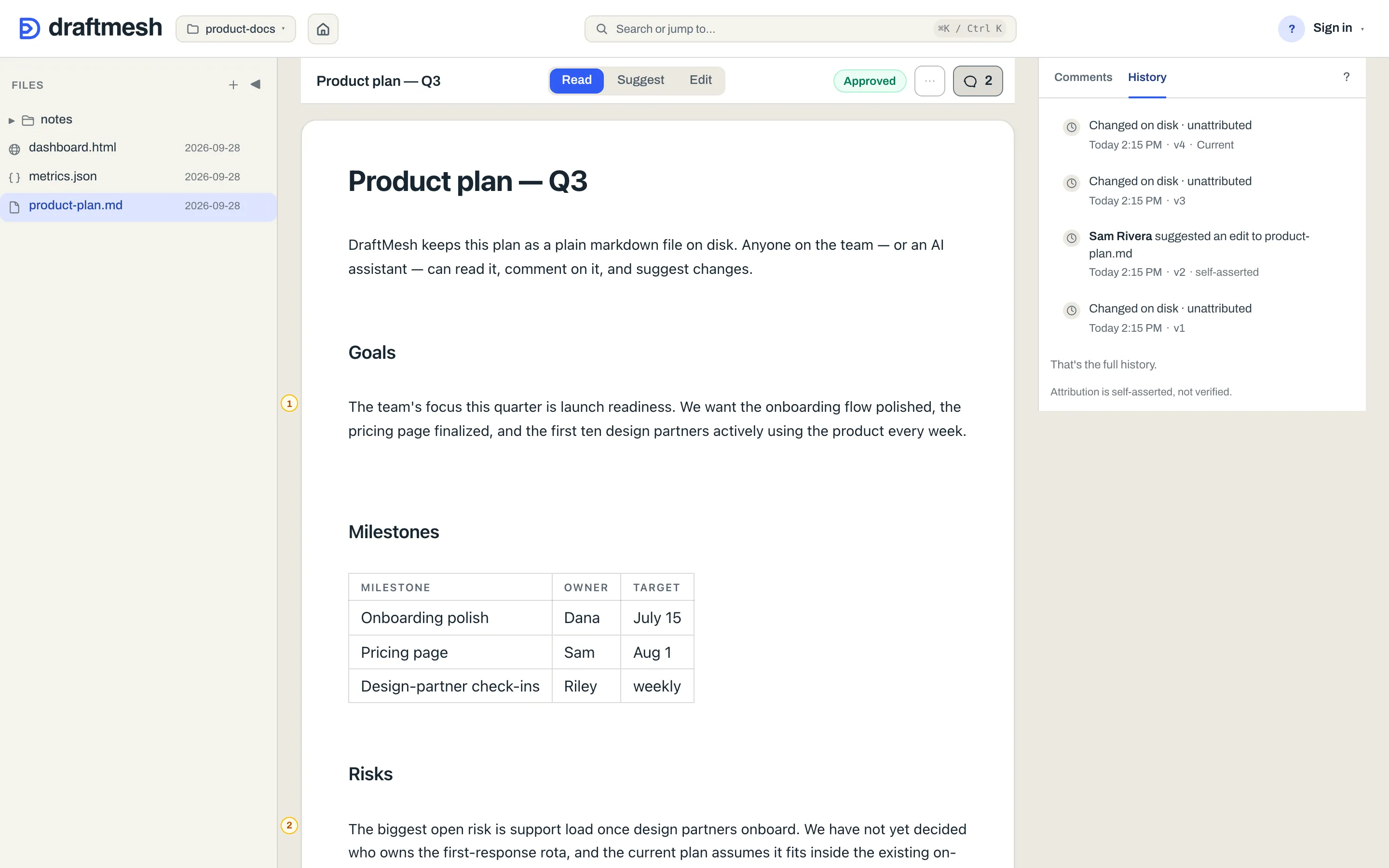
- Click a version to preview the document as it was. Compare with current sits beside Restore version on a selected earlier version, so you can read what changed before you decide.
- Each row leads with who did what — Dana Whitfield edited §Usage-tier personas, Scott Gordon approved, Changed on disk. A version that only touched the discussion names the act rather than calling it an edit: commented on, asked a question on, answered a question on, requested sign-off on, resolved a comment on, accepted a suggestion from research-agent (agent) on, rejected a suggestion on, and restored … from v3 for a restore. The same wording is what an AI assistant reads from the history. Consecutive ordinary edits by the same person within five minutes collapse into one Name made N edits row. Expand it to preview, compare or restore any exact saved version. A run of consecutive DraftMesh Sync pulls similarly collapses into one N sync updates row, so background syncing doesn’t bury the human edits.
- Restore version makes that content the current document — as a new version, so nothing is ever destroyed. You can restore a restore.
- Approvals are recorded against specific versions, so history also answers “what exactly did we sign off on?”
- Each row says how well DraftMesh knows who made it. On DraftMesh cloud, a version a signed-in member created — a save, a comment, an approval, a restore — reads verified account: the service put a signed-in account behind it. A version written on someone’s own machine and read there reads self-asserted: it carries the name that machine was given. When that machine pushes to DraftMesh cloud, History checks which local version introduced the exact bytes being sent. If one assistant introduced every changed path, the row names it AI · self-asserted · via the pushing account. If every path arrived as a bare disk change, it reads Changed on disk · unattributed · via that account. A corroborated suggestion acceptance or rejection is named as a decision and marked recorded on a device. Mixed, personal, guest, incomplete and older pushes keep the signed-in pushing account as the verified author. A comment, suggestion, question, reply or sign-off request added with an assistant’s name in the file also names that assistant, marked AI · self-asserted · via the account that saved it; one added with no name reads Unattributed, via the same account. On the machine itself, an assistant’s version reads self-asserted. On DraftMesh cloud, a version a connected assistant or a personal API token wrote reads Claude on behalf of Scott Gordon — the assistant’s name, and the signed-in account it acted for. Versions a signed-in member created on DraftMesh cloud before September 2026 read self-asserted regardless; they keep that reading. A guest’s version carries a Guest · unverified badge and an assistant’s an AI badge. The footer under the list says the same thing for the host you are on; the rows say it for each version, because one document’s history can mix them.
Comments and suggestions live inside the file, so a version captures the prose and the discussion around it at that moment.
Reading just the decisions
Sign-offs appear in the list as their own rows — Approved this version and Requested changes on this version, each against the version it was recorded on. An All · Decisions control at the top of the tab hides everything else, leaving the document’s decision trail on its own. It appears only when the loaded versions actually hold a decision — on a document nobody has signed off there is nothing to filter, so the control is absent rather than offering an empty view.
The filter is a view over the versions already loaded, so switching it back loses nothing. Load older versions keeps looking further back, and the control appears as soon as a decision comes into view.
Search
Press ⌘ K (Ctrl K), or click the search box in the header:
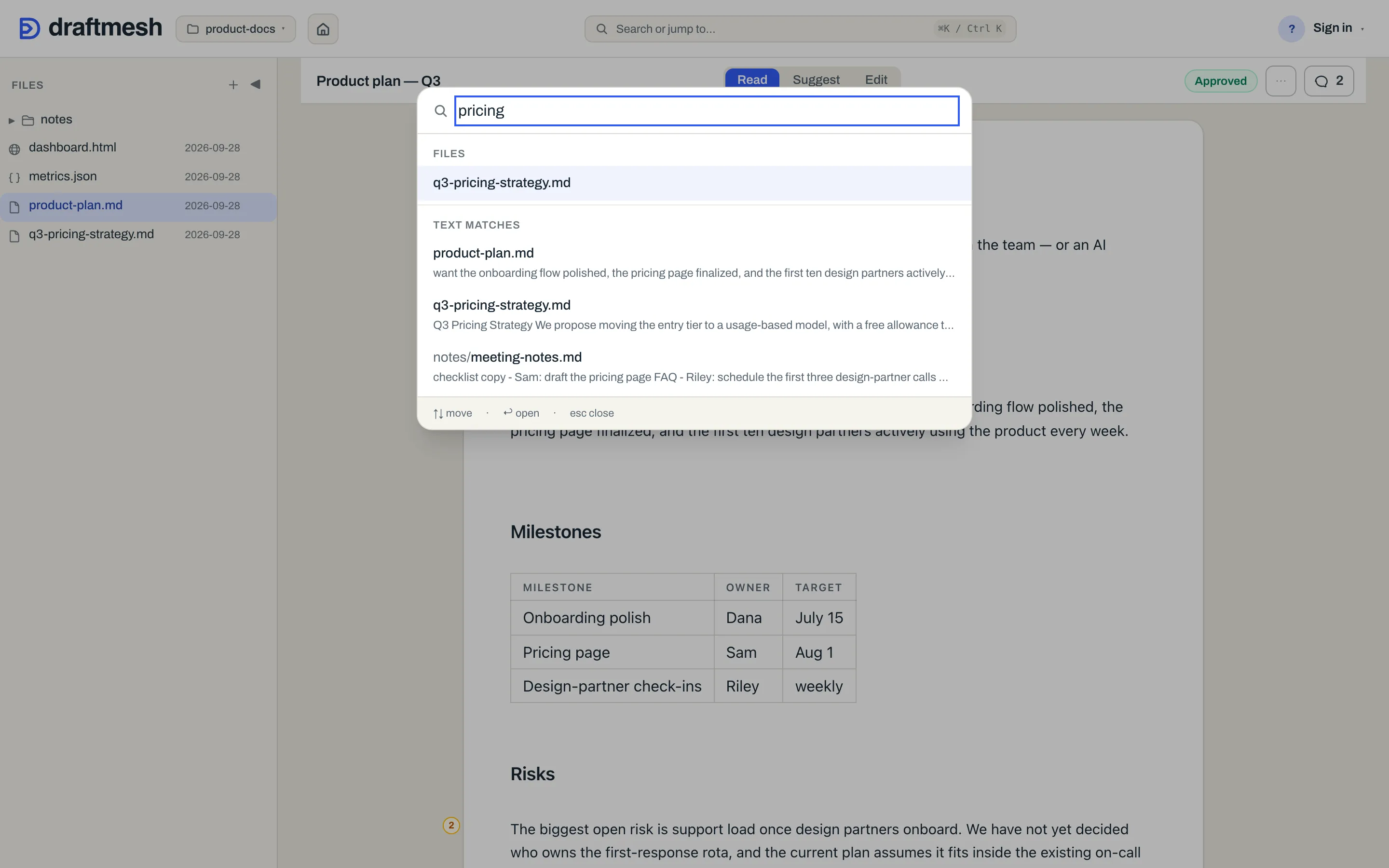
Before you type, the palette lists your recent documents — up to eight, the ones you opened most recently in this browser — so getting back to something is one keystroke. Once you type, results come in three groups:
- Files — file-name matches.
- Text matches — full-text hits with a snippet.
- Related — semantically related passages, found by meaning rather than exact words. The relatedness index is built the first time a workspace is searched by meaning; while semantic search is in use, saved edits are added to it within seconds. While that first build runs, Related says “Still indexing” and shows what it has found so far. On the free local install this group needs the semantic search runtime, which
npm i -g draftmeshleaves out: rundraftmesh setup --semanticonce (about 500 MB, CPU only) and it is on from the next search. DraftMesh cloud has it built in.
Use ↑ ↓ to move, Enter to open, Esc to close. Search covers the workspace you have open.
If something goes wrong
- A save can’t be applied (someone else changed the document first): the toolbar reads Conflict, and DraftMesh never overwrites silently — re-open the latest version and your change can be re-applied. When the toolbar reads Conflict, Compare and combine shows what you changed and what changed on disk side by side, lets you decide each overlapping passage, and saves the combined version; Save my version still replaces what is on disk with your edits. Other failed saves read Save failed, and typing not yet saved reads Unsaved changes.
- “Some documents were not searched”: a full-text search gives itself a few seconds and stops there rather than leaving you waiting, so on a very large workspace it can run out of time before it has read everything. What it did find is shown and is correct — it is just not the whole workspace, so don’t read an empty result as proof that nothing matches. Searching again is the fix; narrowing the words is not, because the documents it missed were never read either.
- “Semantic search is not available on this DraftMesh” (under an empty Text matches result): this DraftMesh has no meaning-based search wired, so only Files and Text matches are searched, and the Related group never appears; an agent asking its MCP door for mode “semantic” gets the same answer. With “right now” in the sentence, meaning-based search is wired but this DraftMesh could not run it for that query — usually because the runtime isn’t installed yet on a local DraftMesh (
draftmesh setup --semanticadds it), or the model failed to load — so Related is absent until it can. - A comment lost its text: it becomes an orphaned comment in the panel rather than disappearing.
- A bad edit shipped: find the last good version in history and restore it.
- A sync conflict: both versions are kept and a guided panel lets you decide — see Workspaces & sync.