Reading, editing & suggesting
DraftMesh's four document modes — Viewing, Editing, Suggesting and Code — and where comments, suggestions and approvals are stored inside the markdown file.
Every markdown document has three modes, switched from the control in the document header — plus the raw markdown, which opens from the document’s ⋯ menu:

In a narrow window the mode control becomes a single menu, and in the narrowest it moves into the document’s ⋯ menu.
Read
The default. The document renders as formatted prose. Select any text — a phrase, a whole section, even across a table — and a small menu appears:
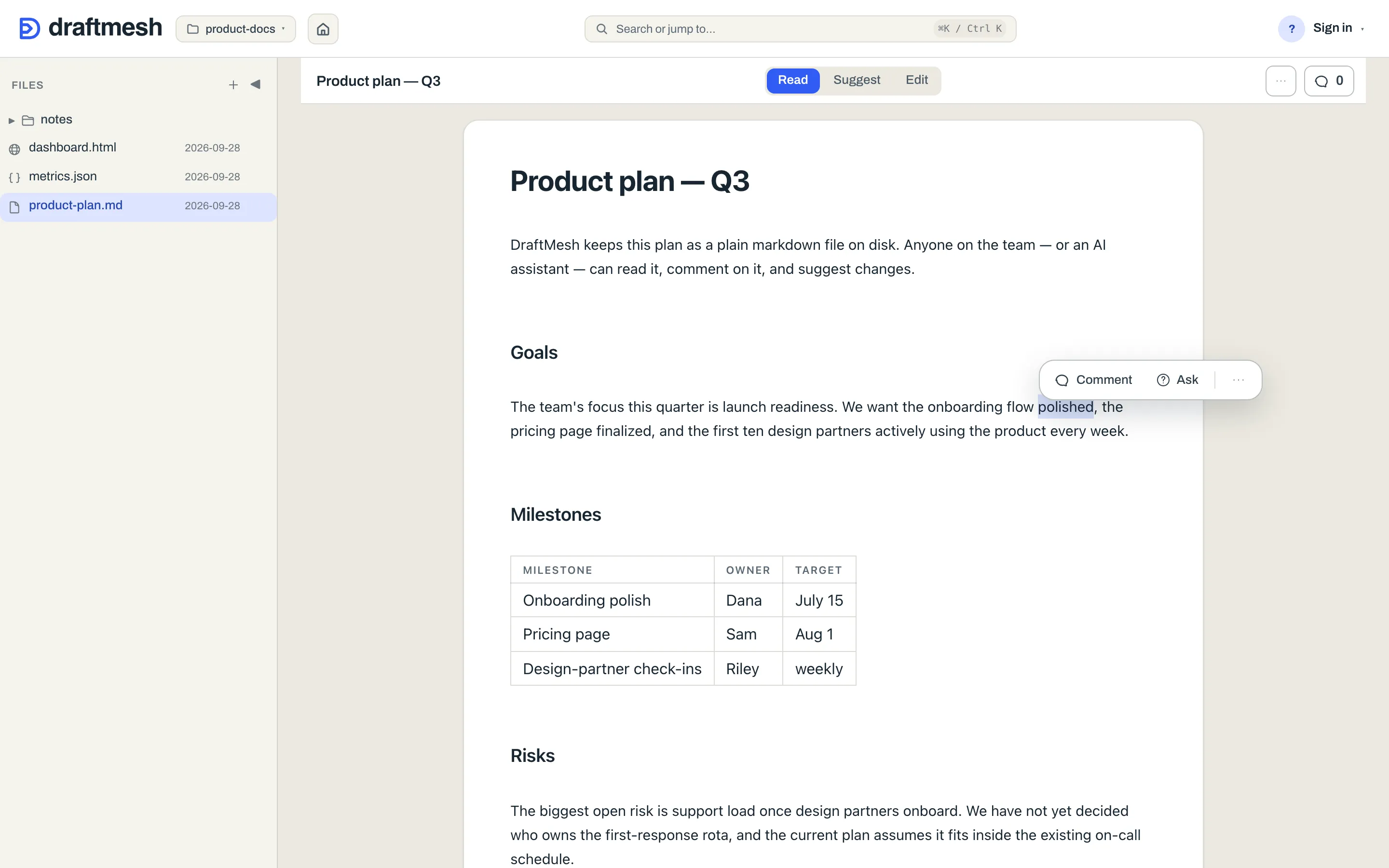
The menu holds annotation verbs only, and their order follows the mode you are in. In Read it is Comment then Ask; in Suggest, Suggest edit comes first, ahead of the same two.
- Comment — attach a comment to exactly the text you selected.
- Ask — record a question anchored to the selection (see Comments & review).
- Suggest edit — propose replacement text for the selection (see below). Offered in Suggest mode.
A verb the access you were granted doesn’t reach is absent, not greyed: the menu never shows you a word you could never press. A verb this particular selection blocks is different — it stays, dimmed, with the reason printed under the row in words: “Suggest needs a selection inside a single paragraph or list item.” You get told why, in the place you looked.
Copy link to section and Share this section moved into the menu’s own ⋯, where sharing is offered at all (and Share this section only to someone who can manage sharing on this document — not to a person who holds it through a share) — Copy link is a deep link that opens this document scrolled to this section, and Share this section issues a guest link exposing only it, on DraftMesh cloud. See Workspaces & sync.
References become links as you read. A plain mention of another document in the workspace — its path, like product/overview.md, or its file name when only one document has that name — is clickable and opens that document here. A mention is a link only when the document exists; a path to something that isn’t in the workspace stays plain text. GitHub issues and pull requests are linked too: owner/repo#123 always, and a bare #123 when the document names its repository. In Read and Suggest a click follows the link; in Edit, ⌘-click (Ctrl-click on Windows and Linux) follows it and a plain click puts the cursor there to edit. Links that leave DraftMesh open in a new tab. None of this touches the file: the links are drawn as the page renders, and the markdown on disk stays exactly as written.
Not every mode is offered on every document. Suggest and Edit are absent on HTML and JSON files, which have no prose editor — those show Read and Source — and absent when the access you were granted doesn’t reach that far: a document shared with you at comment shows Read only, rather than buttons that would fail.
Edit
A full rich-text editor: type directly, and formatting (headings, bold, lists, tables) is applied as you write. Edit shows a formatting toolbar above the document — Bold, Italic, a Heading level picker, Bullet list, Ordered list, Link and Image (pasting or dropping a picture works too — see Supported file types). Type / at the start of an empty line (or after a space), outside a list, to open the Insert block menu: Heading 1, Heading 2, Heading 3, Bulleted list, Numbered list and Quote. Typing after the slash filters it, the arrow keys and Enter pick an item, and Esc closes it and keeps the slash, so paths like /usr/bin and dates like 9/26 still type normally. To leave a comment, select the text and choose Comment in the menu that appears beside it, or press ⌘⌥M / Ctrl Alt M. (The markdown source has its own floating bar over the selection: Bold, Italic, Inline code, Link, and Comment on selection.)
There is no Save button — changes auto-save, and the status in the document header tells you when the document is Saving… or Saved. (⌘ S / Ctrl S saves on the spot if you’d rather not wait.) Every save becomes a version you can restore later. If a save can’t be applied because someone else changed the document first, the toolbar says Conflict; other failures show Save failed, and pending typing shows Unsaved changes — rather than showing you a reassuring “Saved” that isn’t true. When the toolbar reads Conflict, Compare and combine shows what you changed and what changed on disk side by side, lets you decide each overlapping passage, and saves the combined version; Save my version still replaces what is on disk with your edits.
Suggest
Propose changes without changing the document. Select text and choose Suggest, or switch to Suggest mode and simply type — your edits are captured as tracked changes instead of being applied.
A change you type in Suggest mode saves itself as a suggestion: after a short pause in your typing, when you move the cursor away from it, or when you leave the page. The line under the document says Saving suggestion… and then Suggestion saved — or Couldn’t save suggestion, with Retry. Once it is saved, Add note on that line attaches a note to it, the note the Suggest form asks for; in this note an @ name is plain text and notifies no one. Closing the tab while a typed change is still unsaved makes the browser ask first. Typing again after a change has saved starts a new suggestion next to it rather than extending the saved one.
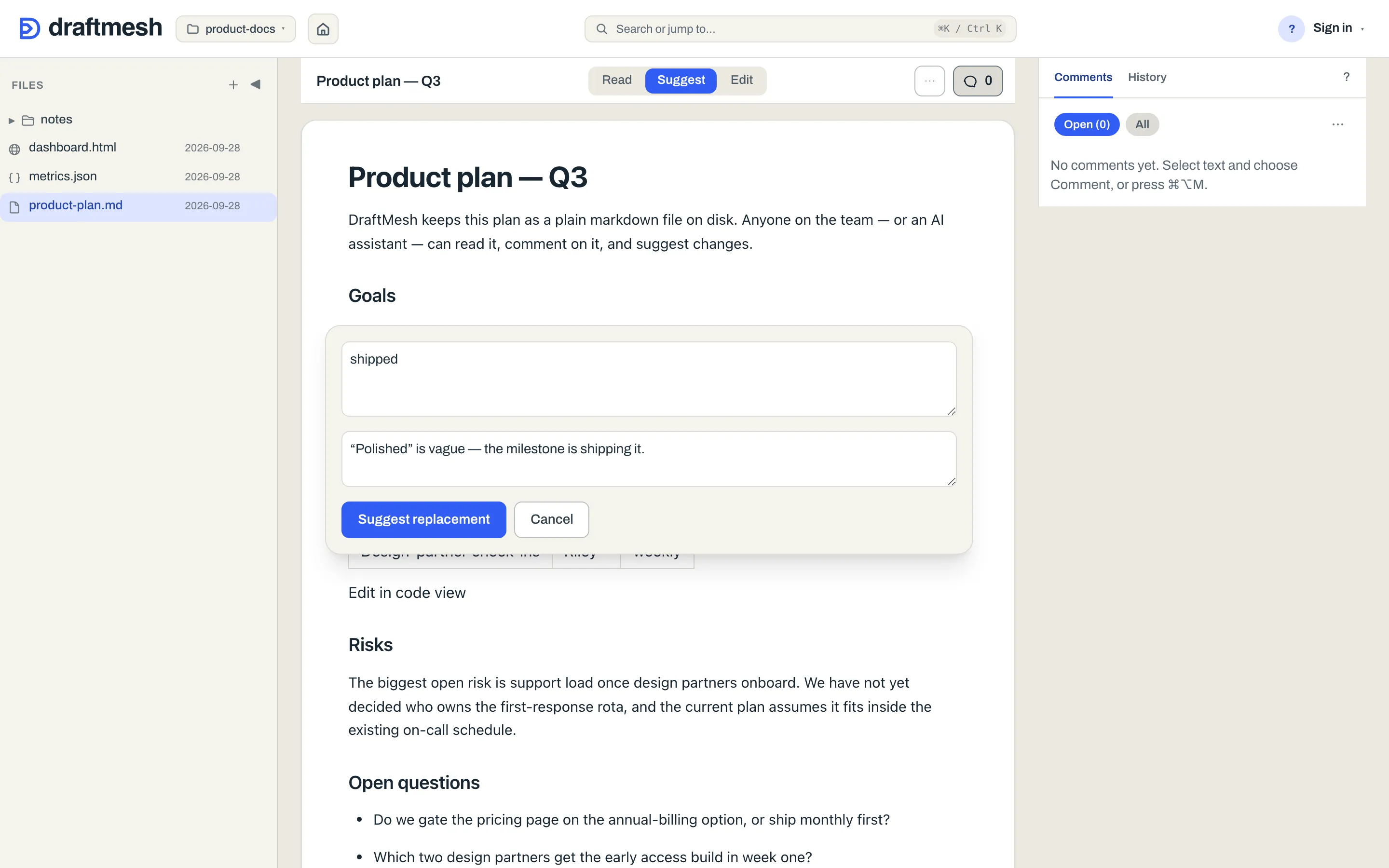
A suggestion shows up in the document as a strikethrough of the old text next to the proposed new text, and in the Inspector’s Comments tab with Accept and Reject buttons. The document’s actual content only changes when someone accepts the suggestion.
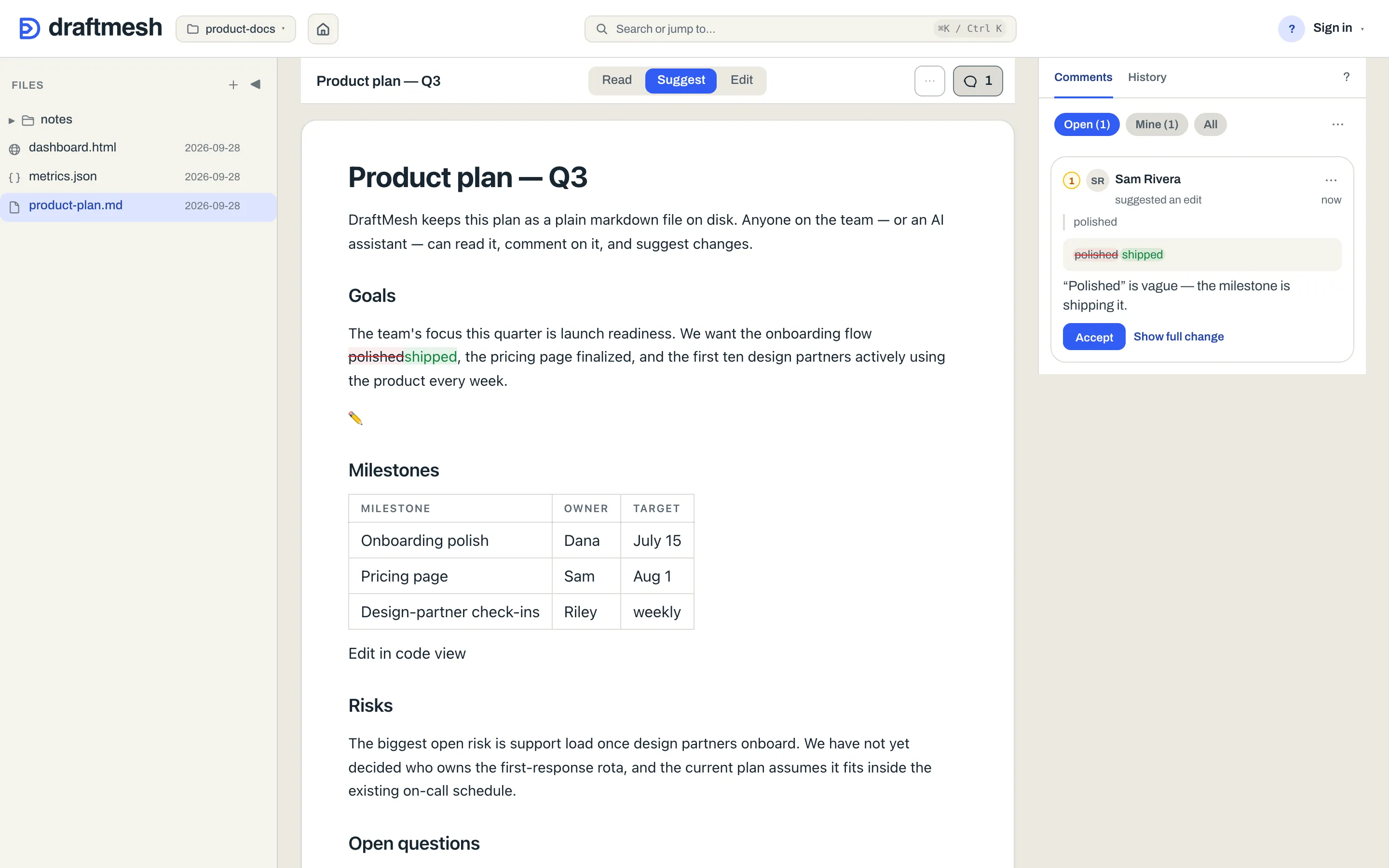
Markdown source
The raw markdown, in a syntax-highlighted editor. Open it with View markdown source in the document’s ⋯ menu (⌘⇧M / Ctrl Shift M). Useful for precise formatting work — and for seeing exactly what is stored in your file, including the annotation markers described below. It auto-saves just like Edit.
Where comments and suggestions live
Comments, suggestions, and approvals are stored inside the markdown file itself, as invisible HTML comments (<!-- @draftmesh{…} -->). You can see them in the markdown source:
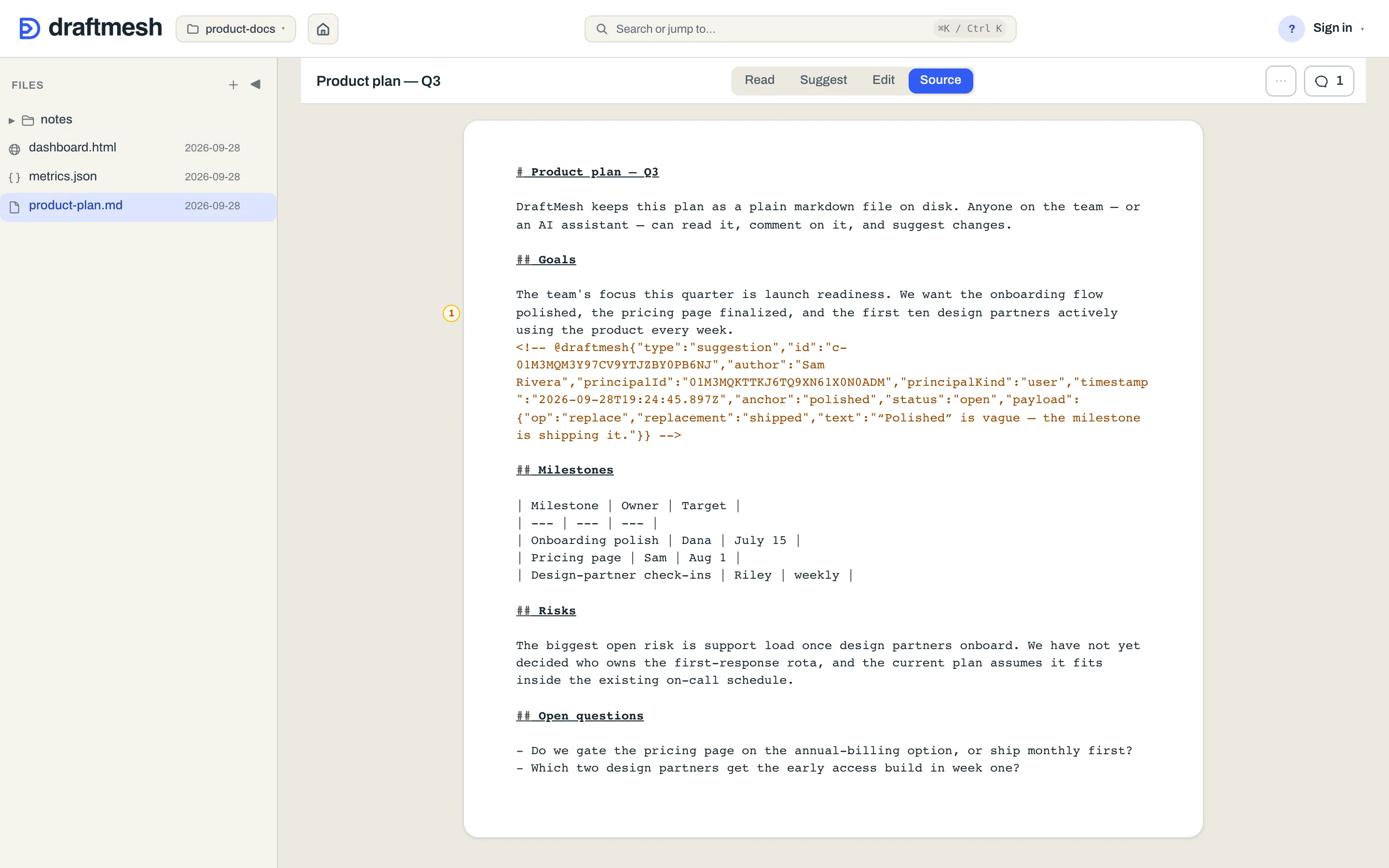
This is what keeps your documents portable: the file works in any editor, the annotations travel with the file, and if another tool edits the text, DraftMesh re-anchors the annotations to the surviving text — or marks them as orphaned rather than losing them.